
Wireless charging has become one of the most convenient features of modern iPhones. Magnetic alignment makes charging easier by guiding the phone into the correct position instead of forcing you to find the precise spot on a traditional wireless pad.
But not every magnetic charger provides the same experience.
Some chargers deliver less power than expected. Some have weak magnets. Others require a separate charger for every device, creating the same cable clutter wireless charging was supposed to eliminate.
If you are searching for the best MagSafe charger for iPhone, the right choice depends on where you charge, which devices you own and whether portability or everyday convenience matters most.
This guide explains how magnetic charging works, how charging speeds differ and which type of charger is best for a desk, nightstand or travel bag.
Quick Answer: What Is the Best MagSafe Charger for iPhone?
For someone who regularly charges an iPhone, Apple Watch and AirPods, a 3-in-1 magnetic wireless charging station is usually the most practical option.
It provides dedicated charging positions for:
- iPhone
- Apple Watch
- AirPods or another compatible wireless-charging case
Instead of managing several cables and adapters, one station can organize the devices you charge every day.
A magnetic charging stand is generally better for an office or nightstand, while a foldable 3-in-1 charger is more practical for someone who frequently travels.
Explore magnetic and Qi2 wireless chargers for Apple devices at The Urban Geek.
What Is MagSafe Charging?
MagSafe is Apple’s magnetic charging and accessory system for compatible iPhones.
A ring of magnets inside the phone helps align it with a compatible charger. When the phone attaches correctly, its receiving coil is positioned over the charger’s transmitting coil.
This improves the everyday charging experience by providing:
- More consistent alignment
- Easier attachment
- Better charging stability
- Less repositioning
- Convenient upright charging
Correct placement matters. The back of the iPhone should sit directly against the raised magnetic charging surface. It should not rest behind the pad or lean against another part of the charger.
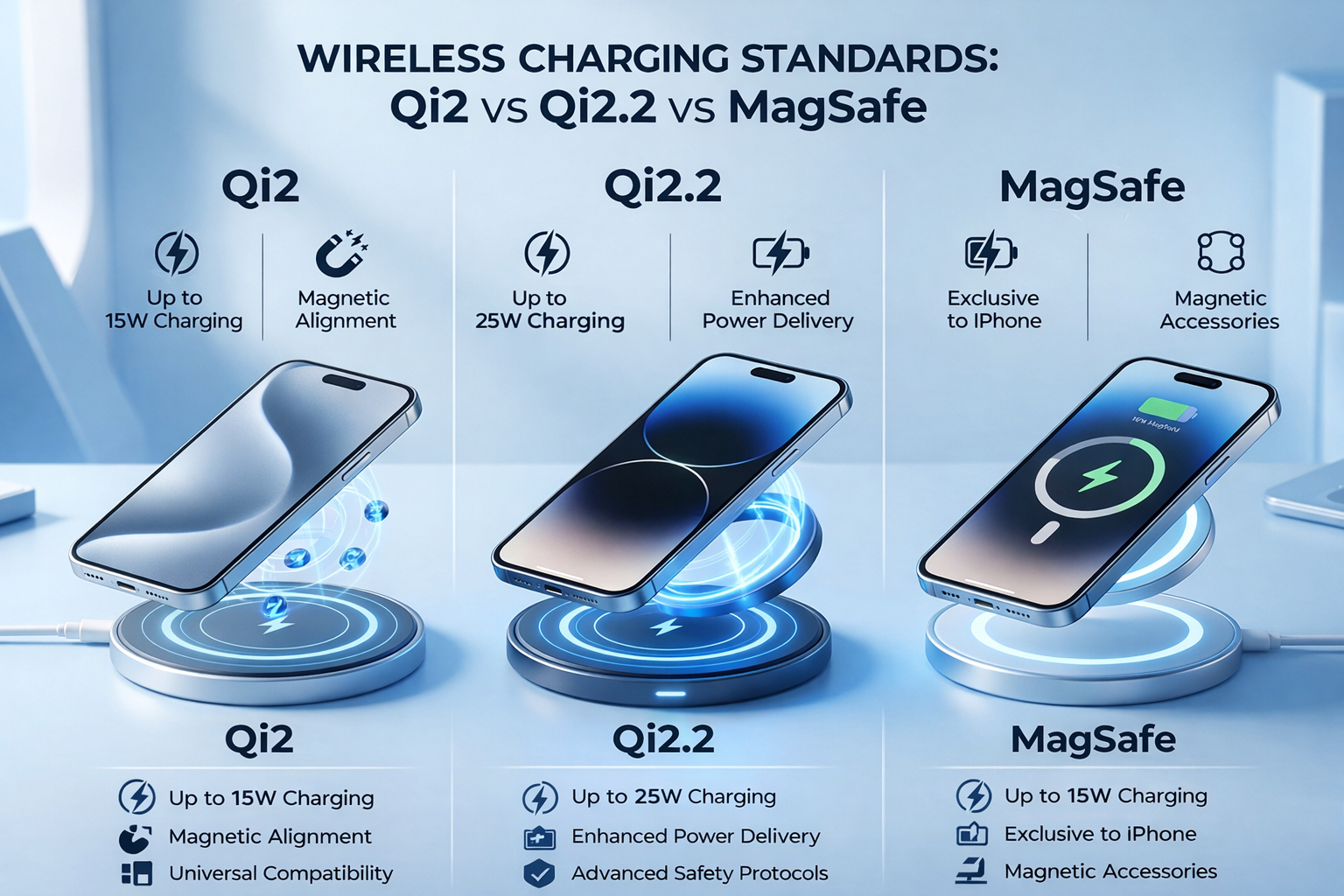
MagSafe-Compatible, Qi2 and Qi2 25W: What Is the Difference?
These terms are related, but they are not interchangeable.
MagSafe
MagSafe is Apple’s proprietary magnetic ecosystem. Apple’s current MagSafe chargers can deliver different peak charging speeds depending on the iPhone, charger model, power adapter and operating conditions.
Qi2
Qi2 is a wireless-charging standard developed by the Wireless Power Consortium. Its Magnetic Power Profile uses magnetic alignment to improve coil positioning and charging consistency across compatible devices.
Qi2 25W
Qi2 25W is the newer, higher-power evolution of Qi2. It raises the potential charging output beyond the original 15W Qi2 level for compatible combinations of phones and chargers.
A charger being described as “magnetic” does not automatically mean that it is MagSafe-certified or Qi2-certified. Check the stated charging standard, supported wattage and device requirements before purchasing.
How Fast Can an iPhone Charge Wirelessly?
There is no single charging speed that applies to every iPhone and every magnetic charger.
Depending on the device and charging equipment, an iPhone may charge wirelessly at 7.5W, 15W or at a higher peak rate.
Apple currently supports wireless charging of up to 25W on certain newer iPhones when they are paired with a compatible MagSafe charger and a sufficiently powerful USB-C adapter. Other iPhones and charging combinations remain limited to lower speeds.
According to Apple’s current MagSafe guidance, delivered power can depend on:
- The specific iPhone model
- The MagSafe charger model
- The USB-C power adapter
- Adapter voltage and wattage
- Device temperature
- System activity
- Connected accessories
The Wireless Power Consortium has also introduced Qi2 25W, extending the Qi2 standard beyond its original 15W level.
The important lesson is simple: the number printed on the charger represents its maximum capability—not a speed guaranteed for every phone.
iPhone Compatibility
Magnetic wireless charging support varies by iPhone model.
Many iPhones beginning with the iPhone 12 generation include Apple’s built-in magnetic alignment system. However, support and maximum charging speed can differ across individual models, including models within the same generation.
Before choosing a charger, confirm:
- Whether your iPhone includes built-in magnetic alignment
- Whether it supports MagSafe, Qi2 or Qi charging
- Its maximum supported wireless-charging input
- Whether your case is magnetically compatible
- Which power adapter the charger requires
A compatible magnetic case can help maintain alignment. A thick, metallic or non-magnetic case may weaken the connection or prevent charging.
Best Types of MagSafe Chargers for iPhone
Different designs serve different routines. These are the three most useful categories.
Best Overall: 3-in-1 Magnetic Charging Station
A 3-in-1 charging station is usually the best choice for someone invested in the Apple ecosystem.
It can provide dedicated charging positions for an iPhone, Apple Watch and AirPods while using one main power connection.
This type of charger is particularly useful for:
- Nightstands
- Home offices
- Productivity desks
- Shared charging areas
- Reducing cable clutter
The raised phone position also makes it easier to see notifications, use FaceTime or take advantage of Apple StandBy mode while charging.
Best for Travel: Foldable 3-in-1 Charger
A foldable magnetic charger provides multi-device charging without taking up as much room in a backpack or carry-on bag.
Look for a design that folds securely, protects its charging surfaces, uses one removable USB-C cable, works with a readily available USB-C adapter and remains stable when unfolded.
A compact charger is especially useful for frequent travelers, remote workers and people who regularly move between home and office.
Best for a Desk: Adjustable Magnetic Charging Stand
An upright charging stand keeps the iPhone visible and accessible.
It is a good option for notifications, video calls, timers, widgets, Apple StandBy mode and keeping the phone off the work surface.
An adjustable or swiveling stand offers more flexibility than a fixed-angle charger because the viewing position can be changed throughout the day.
Best MagSafe-Compatible Chargers Compared
| Charger type | Devices charged | Potential charging speed | Best for | Primary advantage |
|---|---|---|---|---|
| 3-in-1 magnetic charging station | iPhone, Apple Watch and AirPods | Up to the supported limit of the charger and phone | Desk and bedside use | One organized charging location |
| Foldable 3-in-1 travel charger | iPhone, Apple Watch and AirPods | Model and charger dependent | Travel | Compact multi-device charging |
| Magnetic phone stand | Primarily iPhone | Model and charger dependent | Office and StandBy mode | Keeps the phone upright and accessible |
| Magnetic charging pad | Primarily iPhone | Model and charger dependent | Simple everyday charging | Small footprint |
Always check whether the advertised speed applies to the complete charger, the iPhone charging position specifically or only a particular product variant.

A Practical 3-in-1 Option: Urban Geek FlexOrb
The Urban Geek FlexOrb 3-in-1 Wireless Charger is designed for people who want one organized charging station for an iPhone, Apple Watch and AirPods.
Its swiveling design allows the magnetic phone surface to be positioned for desk use, bedside charging or a more compact travel configuration.
The FlexOrb is currently available in different charging configurations, including Qi2 and Qi2 25W options. Select the variant that matches your phone, performance requirements and power adapter.
Actual charging speed will depend on the selected FlexOrb version, the connected adapter, the iPhone model and charging conditions.
How to Choose the Best Magnetic Charger
Confirm the charging standard
Do not rely only on words such as “magnetic,” “fast” or “MagSafe-compatible.” Check whether the charger specifies Qi, Qi2, Qi2 25W or official MagSafe certification.
Match the charger to your iPhone
A high-output charger cannot force an older or incompatible iPhone to accept more power than the phone supports.
Use the correct power adapter
The charger’s maximum output may require a particular USB-C Power Delivery adapter. Using an underpowered adapter can reduce charging speed. For a multi-device station, the adapter must also supply enough total power for all charging positions.
Check magnetic strength
The connection should keep the phone properly aligned without making it unnecessarily difficult to remove. Weak alignment can cause the phone to shift, particularly when it is mounted upright.
Consider heat management
Wireless charging produces heat. Actual charging speed may be reduced when the phone or charger becomes too warm. Avoid charging in direct sunlight, under heavy insulation or in another environment where heat cannot dissipate effectively.
Check case compatibility
Use a properly fitted magnetic charging case. Avoid placing cards, keys, metallic objects or magnetic-storage items between the phone and charger.
Examine the complete layout
For a 3-in-1 station, make sure each device has a clearly designated charging position:
- The iPhone attaches directly to the magnetic phone pad
- The Apple Watch rests on its watch-charging surface
- The AirPods case sits on the base or designated Qi charging area
Is a 3-in-1 Charger Worth It?
A 3-in-1 charger is most valuable when you genuinely use all three charging positions.
It can reduce the number of visible cables and wall adapters, the time spent moving chargers between rooms and the chance of forgetting to charge one device.
However, someone who only owns an iPhone may receive better value from a high-quality single-device stand. Choose based on your actual devices rather than the maximum number a station can theoretically charge.
Is Magnetic Wireless Charging Safe?
A properly designed, compatible charger should regulate power based on the connected device and operating conditions.
It is normal for an iPhone and wireless charger to become warm during charging. If the device becomes too warm, the iPhone may reduce or temporarily limit charging to help protect the battery.
For reliable operation:
- Use a compatible USB-C adapter
- Keep charging surfaces clean
- Remove foreign objects between the phone and charger
- Avoid damaged cables
- Do not charge in excessive heat
- Follow the manufacturer’s operating instructions
Why Magnetic Charging Continues to Grow
Magnetic alignment addresses one of the main frustrations with traditional wireless charging: inconsistent placement.
The continued development of Qi2 and Qi2 25W also extends magnetic charging beyond one manufacturer’s accessory ecosystem.
The long-term advantages include more reliable device positioning, faster potential wireless charging, wider compatibility, cleaner charging stations and more useful stands and travel designs.
However, compatibility remains important. A charger, phone and adapter must support the same requirements to achieve the advertised performance.
Upgrade Your Charging Setup
If you want fewer cables and one organized place to charge your everyday Apple devices, a multi-device magnetic station can be a practical upgrade.
- Urban Geek FlexOrb 3-in-1 Wireless Charger
- Wireless chargers and magnetic charging accessories
- The Urban Geek Wireless Charging Guide
Best MagSafe Charger for iPhone: Final Verdict
The best charger is the one that matches your iPhone, devices and charging routine.
Prioritize verified compatibility, the appropriate charging standard, realistic charging-speed expectations, strong magnetic alignment, a suitable USB-C adapter, effective heat management, proper device placement and a stable design.
For an Apple user who regularly charges an iPhone, Apple Watch and AirPods, a well-designed 3-in-1 magnetic charging station offers the strongest balance of organization and convenience.
For someone who charges only an iPhone, a simple magnetic stand may be the better investment.
Frequently Asked Questions
Are MagSafe chargers worth it?
They can be worth it if you value automatic alignment, upright charging and a cleaner setup. The benefit is greatest when the charger suits your daily routine and supports your iPhone’s charging capabilities.
Do MagSafe chargers work with cases?
Yes, when the case is designed for magnetic wireless charging. Thick, metallic or non-magnetic cases can weaken alignment or interfere with charging.
Can a magnetic charger charge AirPods?
Compatible AirPods wireless-charging cases can charge on an appropriate Qi, Qi2 or MagSafe charging surface. Check the AirPods case and charger specifications.
Is MagSafe faster than standard Qi charging?
It can be. Charging speed depends on the iPhone, charger, adapter and conditions. Certain compatible MagSafe combinations can reach higher peak power than older standard Qi charging configurations.
Does a 25W charger always charge an iPhone at 25W?
No. The charger’s rating is its maximum capability. The iPhone model, charging standard, adapter and operating conditions determine the power actually delivered.
Can I use any USB-C adapter?
The charger may operate with several adapters, but reaching its maximum output can require a specific wattage and USB-C Power Delivery profile. Follow the charger manufacturer’s stated requirements.
Is Qi2 the same as MagSafe?
No. MagSafe is Apple’s technology and accessory ecosystem. Qi2 is an industry wireless-charging standard developed by the Wireless Power Consortium. Both use magnetic alignment, but certification, compatibility and performance can differ.
MagSafe is a trademark of Apple Inc. The Urban Geek offers MagSafe-compatible and Qi2 charging accessories. Charging performance varies by charger version, device, adapter, case, temperature and operating conditions.