
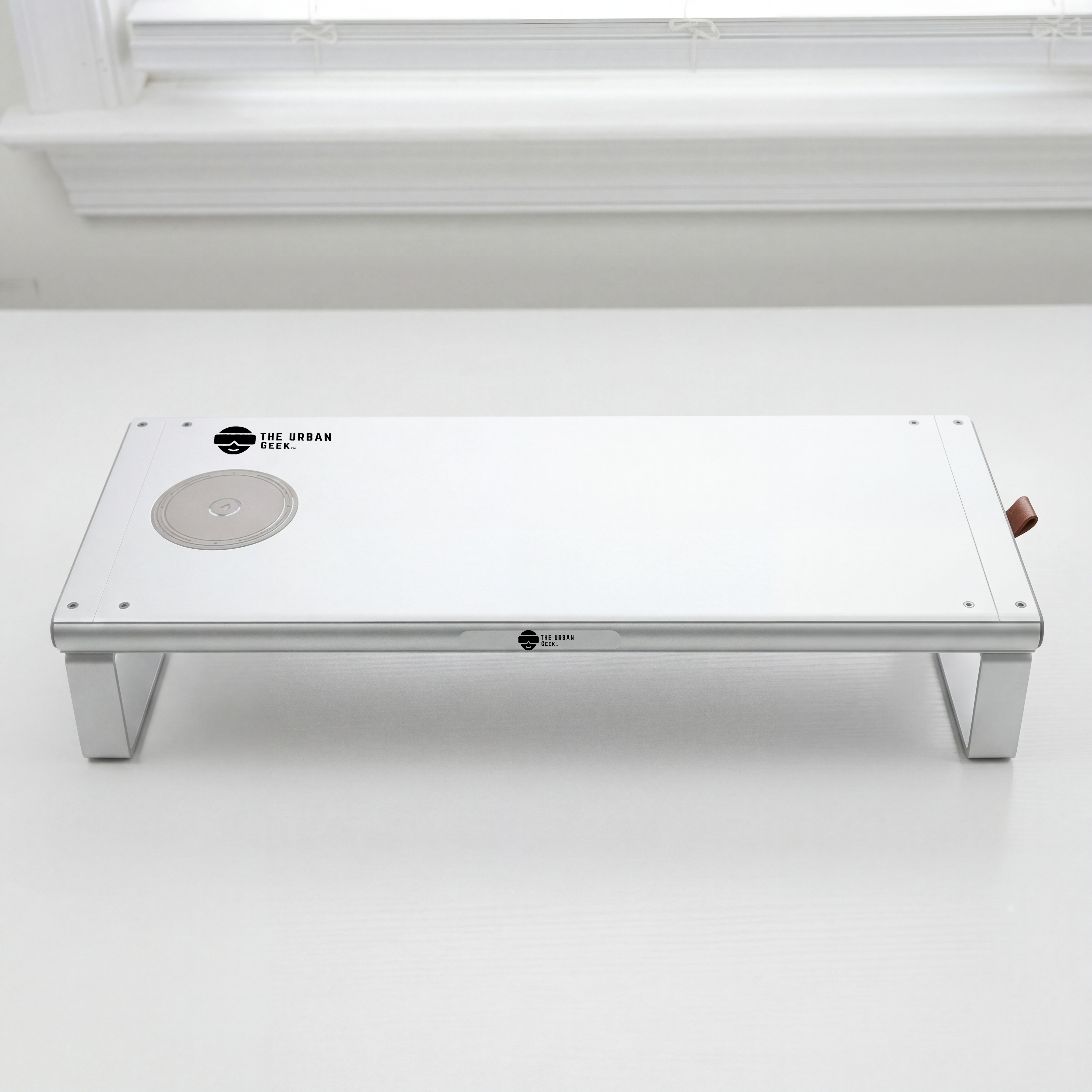


FlexRise 6-in-1 Monitor Riser Docking Station
Aircraft-grade aluminum riser — holds monitors & laptops up to 44 lbs
Built-in 6-in-1 dock — 4K@60Hz HDMI, USB-C, dual USB 3.0
100W Power Delivery — fast-charges your MacBook or PC laptop
15W wireless pad on top + a hidden storage drawer
Your FlexRise's journey
✅ 30-Day Easy Returns | 🛡 1-Year Warranty | 🔒 Secure Checkout
FlexRise 6-in-1 Monitor Riser Docking Station
Upgrade your workspace with FlexRise — the premium monitor riser docking station that does more than lift your screen. Built with a sleek aluminum alloy body, FlexRise combines ergonomic comfort, powerful connectivity, wireless charging, and desk organization into one clean setup. Designed for creators, professionals, gamers, and productivity-focused workstations, FlexRise helps you declutter your desk while keeping your laptop, monitor, phone, and accessories connected.
6-in-1 Docking Station Built In
Connect more with less clutter. FlexRise includes a 4K@60Hz HDMI port, USB 3.0 data transfer, 100W USB-C Power Delivery charging, and wireless charging support — making it a true all-in-one desktop hub and monitor riser docking station.
15W Wireless Charging Pad
Charge your phone directly from your desk riser. The integrated wireless charging area keeps your device powered and within reach while you work — no cables, no clutter.
Heavy-Duty Aluminum Alloy Design
Built from premium aluminum alloy, FlexRise supports monitors and laptops up to 44 lbs, giving your setup a stable, elevated, and modern look that lasts.
Ergonomic Monitor Height
Raise your monitor or laptop to a more comfortable viewing level to help reduce neck and shoulder strain during long work, studio, or gaming sessions.
Declutter Your Desk
Use the open storage space underneath to store your keyboard, notebook, tablet, cables, or desk accessories. Perfect for clean, minimalist workspaces and home office setups.
Built for Modern Workflows
Whether you use a MacBook, MacBook Pro, PC laptop, external monitor, gaming setup, or creator workstation, FlexRise helps expand your screen, power your devices, and organize your desk in one premium platform. Compatible with USB-C laptops supporting DisplayPort Alt Mode.
✓ 6-in-1 monitor riser docking station
✓ 4K@60Hz HDMI output
✓ 100W USB-C Power Delivery (PD 3.0)
✓ 15W wireless charging pad built in
✓ USB 3.0 data transfer
✓ Supports up to 44 lbs
✓ Premium aluminum alloy build
✓ Under-desk storage space
✓ Compatible with MacBook, Dell, HP, Lenovo, Surface, and more
✓ OCP · OVP · ESD Safety Certified
Model: Flex Rise 6-in-1 Monitor Stand Riser
Size: 19.68" L x 8.1" W x 3.5" H
Weight: 4.3 lbs
Load capacity: Holds monitors or laptops up to 44 lbs (≈20 kg)
Color: Space Gray
Material: Aircraft-grade aluminum alloy
Built-in 6-in-1 dock:
- 4K@60Hz HDMI output
- USB-C data port
- 2x USB 3.0 (5 Gbps data)
- 100W USB-C Power Delivery (laptop charging)
- 15W max wireless charging pad on top
Extras: Pull-out storage drawer + integrated cable management
Laptops
- MacBook Pro & MacBook Air (M1–M3)
- Dell, HP, ASUS, and Lenovo USB-C laptops with video output
Desktops & Monitors
- iMac and Mac Mini
- Monitors up to 44 lbs
Phones
- Qi-enabled iPhone and Android phones for the 15W wireless pad
Important Notes
- 4K@60Hz HDMI output requires a host with DisplayPort Alt Mode over USB-C
- 100W Power Delivery requires a compatible USB-C charger and cable
- Ideal for home office, gaming, and creator setups
How much weight can it hold?
The aircraft-grade aluminum frame supports monitors or laptops up to 44 lbs (≈20 kg).
Does the dock charge my laptop?
Yes — the built-in 100W USB-C Power Delivery port charges most USB-C laptops while you work.
Will it drive a 4K monitor?
Yes — the HDMI output supports 4K at 60Hz from a compatible USB-C host.
Can I charge my phone on top?
Yes — the top surface has a 15W max Qi wireless charging pad for iPhone and Android phones.
Where do I store my dongles and drives?
A pull-out storage drawer keeps thumb drives, dongles, and cables tucked away, with built-in cable management underneath.
Choose options
FlexRise 6-in-1 Monitor Riser Docking Station
Aircraft-grade aluminum riser — holds monitors & laptops up to 44 lbs
Built-in 6-in-1 dock — 4K@60Hz HDMI, USB-C, dual USB 3.0
100W Power Delivery — fast-charges your MacBook or PC laptop
15W wireless pad on top + a hidden storage drawer
Your FlexRise's journey
✅ 30-Day Easy Returns | 🛡 1-Year Warranty | 🔒 Secure Checkout
FlexRise 6-in-1 Monitor Riser Docking Station
Upgrade your workspace with FlexRise — the premium monitor riser docking station that does more than lift your screen. Built with a sleek aluminum alloy body, FlexRise combines ergonomic comfort, powerful connectivity, wireless charging, and desk organization into one clean setup. Designed for creators, professionals, gamers, and productivity-focused workstations, FlexRise helps you declutter your desk while keeping your laptop, monitor, phone, and accessories connected.
6-in-1 Docking Station Built In
Connect more with less clutter. FlexRise includes a 4K@60Hz HDMI port, USB 3.0 data transfer, 100W USB-C Power Delivery charging, and wireless charging support — making it a true all-in-one desktop hub and monitor riser docking station.
15W Wireless Charging Pad
Charge your phone directly from your desk riser. The integrated wireless charging area keeps your device powered and within reach while you work — no cables, no clutter.
Heavy-Duty Aluminum Alloy Design
Built from premium aluminum alloy, FlexRise supports monitors and laptops up to 44 lbs, giving your setup a stable, elevated, and modern look that lasts.
Ergonomic Monitor Height
Raise your monitor or laptop to a more comfortable viewing level to help reduce neck and shoulder strain during long work, studio, or gaming sessions.
Declutter Your Desk
Use the open storage space underneath to store your keyboard, notebook, tablet, cables, or desk accessories. Perfect for clean, minimalist workspaces and home office setups.
Built for Modern Workflows
Whether you use a MacBook, MacBook Pro, PC laptop, external monitor, gaming setup, or creator workstation, FlexRise helps expand your screen, power your devices, and organize your desk in one premium platform. Compatible with USB-C laptops supporting DisplayPort Alt Mode.
✓ 6-in-1 monitor riser docking station
✓ 4K@60Hz HDMI output
✓ 100W USB-C Power Delivery (PD 3.0)
✓ 15W wireless charging pad built in
✓ USB 3.0 data transfer
✓ Supports up to 44 lbs
✓ Premium aluminum alloy build
✓ Under-desk storage space
✓ Compatible with MacBook, Dell, HP, Lenovo, Surface, and more
✓ OCP · OVP · ESD Safety Certified
Model: Flex Rise 6-in-1 Monitor Stand Riser
Size: 19.68" L x 8.1" W x 3.5" H
Weight: 4.3 lbs
Load capacity: Holds monitors or laptops up to 44 lbs (≈20 kg)
Color: Space Gray
Material: Aircraft-grade aluminum alloy
Built-in 6-in-1 dock:
- 4K@60Hz HDMI output
- USB-C data port
- 2x USB 3.0 (5 Gbps data)
- 100W USB-C Power Delivery (laptop charging)
- 15W max wireless charging pad on top
Extras: Pull-out storage drawer + integrated cable management
Laptops
- MacBook Pro & MacBook Air (M1–M3)
- Dell, HP, ASUS, and Lenovo USB-C laptops with video output
Desktops & Monitors
- iMac and Mac Mini
- Monitors up to 44 lbs
Phones
- Qi-enabled iPhone and Android phones for the 15W wireless pad
Important Notes
- 4K@60Hz HDMI output requires a host with DisplayPort Alt Mode over USB-C
- 100W Power Delivery requires a compatible USB-C charger and cable
- Ideal for home office, gaming, and creator setups
How much weight can it hold?
The aircraft-grade aluminum frame supports monitors or laptops up to 44 lbs (≈20 kg).
Does the dock charge my laptop?
Yes — the built-in 100W USB-C Power Delivery port charges most USB-C laptops while you work.
Will it drive a 4K monitor?
Yes — the HDMI output supports 4K at 60Hz from a compatible USB-C host.
Can I charge my phone on top?
Yes — the top surface has a 15W max Qi wireless charging pad for iPhone and Android phones.
Where do I store my dongles and drives?
A pull-out storage drawer keeps thumb drives, dongles, and cables tucked away, with built-in cable management underneath.
FlexRise 6-in-1 Monitor Riser Docking Station
Aircraft-grade aluminum riser — holds monitors & laptops up to 44 lbs
Built-in 6-in-1 dock — 4K@60Hz HDMI, USB-C, dual USB 3.0
100W Power Delivery — fast-charges your MacBook or PC laptop
15W wireless pad on top + a hidden storage drawer
Your FlexRise's journey
✅ 30-Day Easy Returns | 🛡 1-Year Warranty | 🔒 Secure Checkout
FlexRise 6-in-1 Monitor Riser Docking Station
Upgrade your workspace with FlexRise — the premium monitor riser docking station that does more than lift your screen. Built with a sleek aluminum alloy body, FlexRise combines ergonomic comfort, powerful connectivity, wireless charging, and desk organization into one clean setup. Designed for creators, professionals, gamers, and productivity-focused workstations, FlexRise helps you declutter your desk while keeping your laptop, monitor, phone, and accessories connected.
6-in-1 Docking Station Built In
Connect more with less clutter. FlexRise includes a 4K@60Hz HDMI port, USB 3.0 data transfer, 100W USB-C Power Delivery charging, and wireless charging support — making it a true all-in-one desktop hub and monitor riser docking station.
15W Wireless Charging Pad
Charge your phone directly from your desk riser. The integrated wireless charging area keeps your device powered and within reach while you work — no cables, no clutter.
Heavy-Duty Aluminum Alloy Design
Built from premium aluminum alloy, FlexRise supports monitors and laptops up to 44 lbs, giving your setup a stable, elevated, and modern look that lasts.
Ergonomic Monitor Height
Raise your monitor or laptop to a more comfortable viewing level to help reduce neck and shoulder strain during long work, studio, or gaming sessions.
Declutter Your Desk
Use the open storage space underneath to store your keyboard, notebook, tablet, cables, or desk accessories. Perfect for clean, minimalist workspaces and home office setups.
Built for Modern Workflows
Whether you use a MacBook, MacBook Pro, PC laptop, external monitor, gaming setup, or creator workstation, FlexRise helps expand your screen, power your devices, and organize your desk in one premium platform. Compatible with USB-C laptops supporting DisplayPort Alt Mode.
✓ 6-in-1 monitor riser docking station
✓ 4K@60Hz HDMI output
✓ 100W USB-C Power Delivery (PD 3.0)
✓ 15W wireless charging pad built in
✓ USB 3.0 data transfer
✓ Supports up to 44 lbs
✓ Premium aluminum alloy build
✓ Under-desk storage space
✓ Compatible with MacBook, Dell, HP, Lenovo, Surface, and more
✓ OCP · OVP · ESD Safety Certified
Model: Flex Rise 6-in-1 Monitor Stand Riser
Size: 19.68" L x 8.1" W x 3.5" H
Weight: 4.3 lbs
Load capacity: Holds monitors or laptops up to 44 lbs (≈20 kg)
Color: Space Gray
Material: Aircraft-grade aluminum alloy
Built-in 6-in-1 dock:
- 4K@60Hz HDMI output
- USB-C data port
- 2x USB 3.0 (5 Gbps data)
- 100W USB-C Power Delivery (laptop charging)
- 15W max wireless charging pad on top
Extras: Pull-out storage drawer + integrated cable management
Laptops
- MacBook Pro & MacBook Air (M1–M3)
- Dell, HP, ASUS, and Lenovo USB-C laptops with video output
Desktops & Monitors
- iMac and Mac Mini
- Monitors up to 44 lbs
Phones
- Qi-enabled iPhone and Android phones for the 15W wireless pad
Important Notes
- 4K@60Hz HDMI output requires a host with DisplayPort Alt Mode over USB-C
- 100W Power Delivery requires a compatible USB-C charger and cable
- Ideal for home office, gaming, and creator setups
How much weight can it hold?
The aircraft-grade aluminum frame supports monitors or laptops up to 44 lbs (≈20 kg).
Does the dock charge my laptop?
Yes — the built-in 100W USB-C Power Delivery port charges most USB-C laptops while you work.
Will it drive a 4K monitor?
Yes — the HDMI output supports 4K at 60Hz from a compatible USB-C host.
Can I charge my phone on top?
Yes — the top surface has a 15W max Qi wireless charging pad for iPhone and Android phones.
Where do I store my dongles and drives?
A pull-out storage drawer keeps thumb drives, dongles, and cables tucked away, with built-in cable management underneath.
Two desk problems, solved by one deck
It lifts your screen to eye level and clears the tangle of chargers and dongles off your desk — at the same time, from one cable.
Your monitor, at eye level
The aluminum deck lifts your display about four inches, so your neck stops craning and your posture stops paying for it.

One cable replaces the drawer
Six connections live inside the base. Plug in once and your laptop charges, drives a second display, and reaches every accessory.


Built around how you actually sit
Raise the screen, reclaim the desk underneath, and route one cable to the back. The clutter disappears and your eyeline lands right where it should.
Every port you reach for, built in
One USB-C line into the base fans out to power, video, data and a wireless pad — no dongle graveyard required.
15W wireless charging, right on top
Drop your phone on the deck and it charges while you work — no extra pad, no extra cable to find.
USB-C Power Delivery
Enough to charge most USB-C laptops at full speed while everything else stays connected.
HDMI display out
Send a crisp second screen to any HDMI monitor, straight from the dock.
From desk clutter to a clean setup in three moves
Set it down, plug in once, and drop your phone on top. That’s the whole ritual.
Set your monitor on top
Place the deck on your desk and rest your monitor on it — instant eye-level lift and a tidy shelf underneath.
Connect one USB-C cable
Run a single cable to your laptop. Power, a second display and every port come alive at once.
Drop your phone on the pad
Lay your phone on the 15W wireless zone and it charges while you work. No cable, no fuss.
One deck, every kind of desk
The same riser that fixes your posture at home tidies up the hot desk and the studio too.

Home office
Lift the monitor, hide the cables, and reclaim the desk you actually work on.
Laptop + monitor
Charge the laptop and drive a second screen from one cable you never unplug.
Creators
Card reader, fast data ports and a wireless pad, all within arm’s reach.
Hot desk & hybrid
Dock in the morning, undock at night — the whole setup travels on one cable.
One USB-C cable runs the whole deck
A single connection carries power, video and data both ways. Works with USB-C MacBooks (M1 / M2 / M3) and Windows 10/11 laptops.
Cheaper than piecing it together
A riser, a dock and a wireless charger bought separately cost more and clutter more than one deck that does all three.
Three gadgets, three purchases
Typical prices for a metal riser, a multiport USB-C dock and a 15W wireless pad — three boxes, three cables, more desk clutter.
All three, in one deck
- Eye-level aluminum monitor riser
- 100W USB-C dock: 4K HDMI, USB-A / USB-C, SD reader
- 15W wireless charging pad built into the top
- One cable to your laptop, one clean setup
One deck instead of three gadgets — for about what the parts would cost on their own.
Comparison prices are typical market estimates. Actual prices may vary based on specifications.
What arrives at your door
Your FlexRise is assembled to order and ships as a complete, ready-to-use kit — in about four weeks.

FlexRise dock
6-in-1 aluminum monitor riser

The whole kit
100W GAN adapter, USB-C cable included

Built-in drawer
Keep your desk organized.
Specifications
Raise your setup. Tidy your desk.
Six functions, one cable, one clean deck — built to order and delivered in about four weeks.
Add FlexRise - $149.99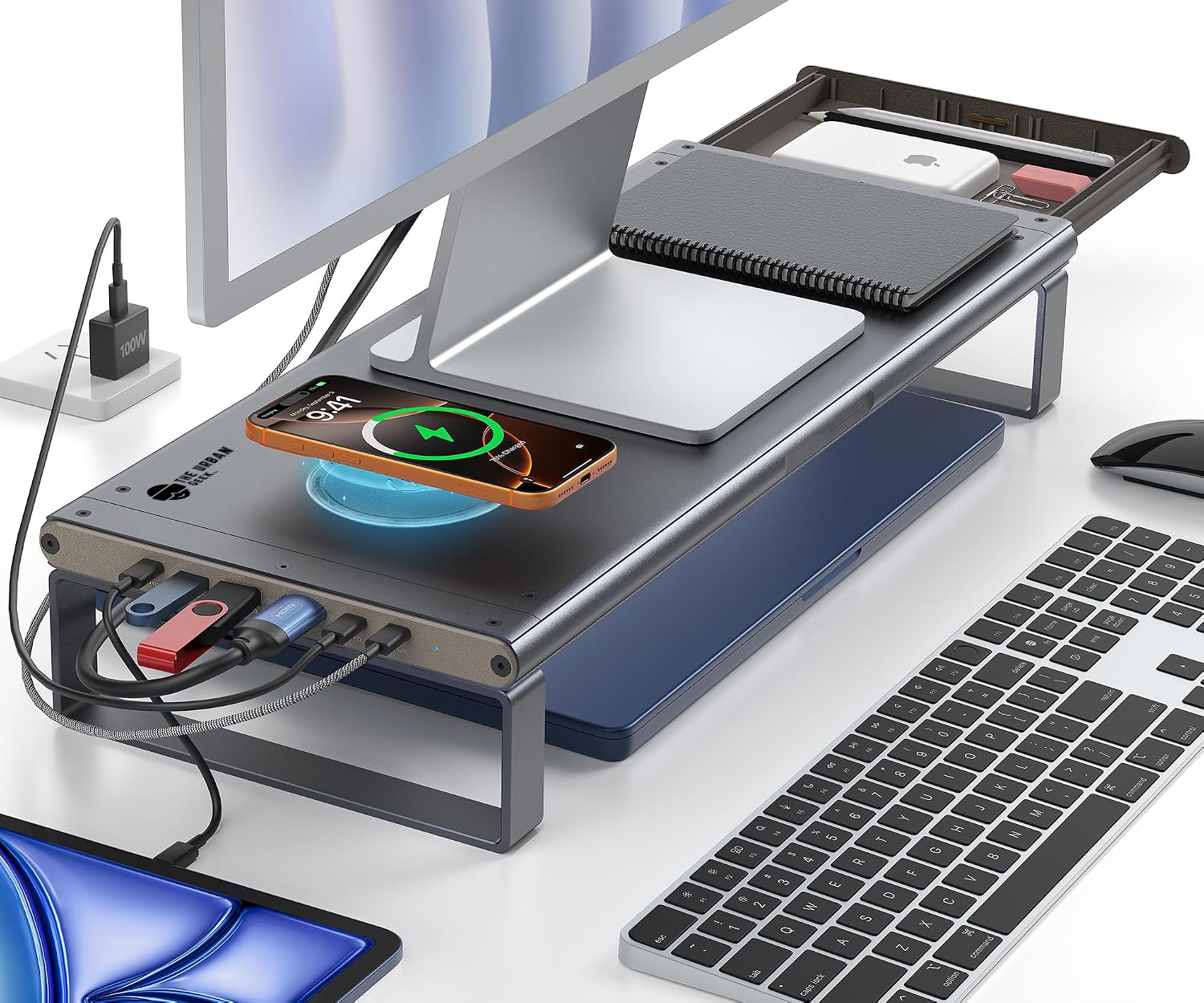
Stay in the Loop
Early access to new gear, exclusive discounts, & no-fluff tech guides delivered to your inbox.
No spam. Unsubscribe anytime. We respect your inbox.